
Our tools as Clay columns. Copy, paste, run.
Every tool here runs inside Clay through its Apify integration: add a column, paste the input, and each row is enriched in seconds. Billing goes to your own Apify account, at the tool's normal per-result price.
One-time setup
- Create a free Apify account (it includes monthly free credit) and copy an API token from Settings, API and Integrations.
- In Clay, open a table, Add column, search Apify, pick Run Apify Actor and connect the token.
- Pick a recipe below, paste its input, and type
/inside the quotes to insert your own column (the recipes write it as/Website,/Company Nameand so on). - Turn auto-update off, save, and run one row first. On a result, Add as column turns any field into its own column.
What it looks like
Two real tables, built with the recipes on this page.
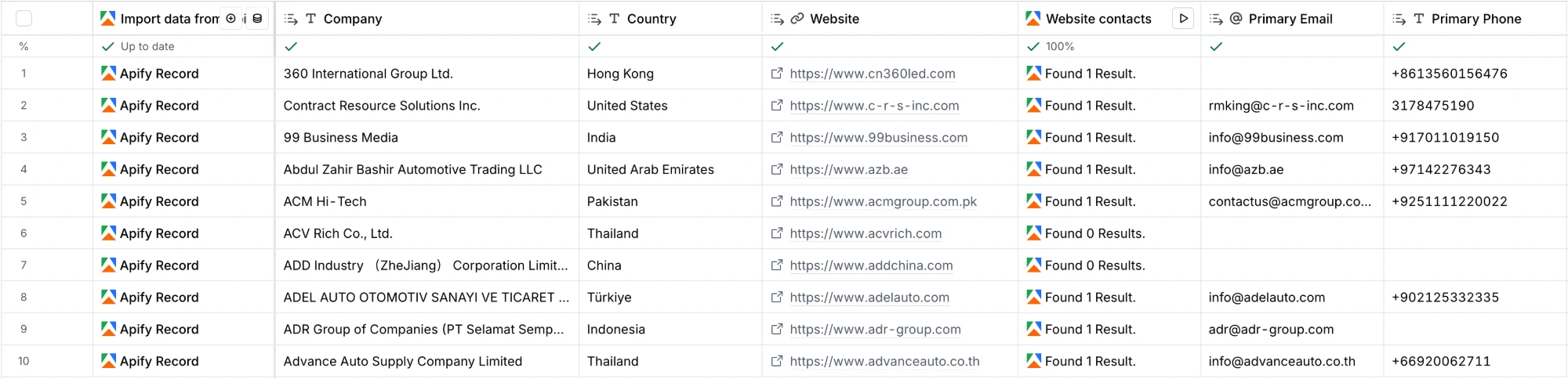
Trade show leads
Ten exhibitors from a trade show, imported as a source, then one column reads each exhibitor's website. Seven come back with an email, eight with a phone; sites that are down simply return nothing.
Account research
Five accounts, five columns: registry record, US imports, news, sanctions check and hiring activity, with three fields pulled out as their own columns. One of the five is a sanctions match.

Enrichment columns
One row in, one answer out. Cost is per row on your Apify account, at free plan prices.
Sanctions check
You need: Company or person name. You get: match, possible-match or no-match against OFAC, UN, UK, Canada, Switzerland and EU lists, with the listing, programme and source link.
Tool: tacps126/sanctions-screener · about 0.8 cents per row · fields to add as columns: status, topScore, matchCount, matches
{"names":["/Name"]}Emails and phones from a website
You need: Website or domain. You get: public emails, phone numbers, social profiles and the contact page, read from the company's own site.
Tool: tacps126/contact-details · about 0.275 cents per row · fields to add as columns: primaryEmail, emails, phones, contactPageUrl, companyName
{"startUrls":["/Website"],"maxPagesPerSite":5}Official company registry record
You need: Company name and 2-letter country code. You get: registration number, legal form, status, founding date, industry code and registered address from the official register.
Tool: tacps126/company-registry · about 0.35 cents per row · fields to add as columns: registryId, legalForm, status, registeredOn, industry, employees, address, website
{"mode":"search","names":["/Company Name"],"countries":["/Country Code"],"maxItems":1}US import volume and suppliers
You need: Company name (US importers). You get: sea shipments in the last 12 months and the 12 before, growth, sourcing countries, product categories and carriers.
Tool: tacps126/us-import-records · about 0.5 cents per row · fields to add as columns: shipments12m, shipmentGrowthPct, lastShipment, topCountries, products, topCarriers
{"companies":["/Company Name"],"includePartners":false,"maxItems":1}Hiring activity
You need: Company website (a name or a jobs page link also works). You get: open roles, roles posted in the last 7 days, split by function, seniority and location, a hiring signal score and the jobs page it found; companies without a supported jobs board come back as no-job-board-found at no charge.
Tool: tacps126/hiring-signals · about $0.011 per row · fields to add as columns: totalOpenRoles, rolesPostedLast7Days, functions, seniority, topLocations, remoteShare, signalScore, jobsPage, status
{"companies":["/Website"],"includeRoles":false}Shopify store profile
You need: Store website. You get: catalog size and freshness, price range, location, currency, payment options, public contacts and social profiles.
Tool: tacps126/shopify-store-analyzer · about 0.935 cents per row · fields to add as columns: storeName, productCount, catalog, currency, country, primaryEmail, primaryPhone, instagram, shipsToCountries
{"startUrls":["/Website"]}Recent news mentions
You need: Company name. You get: the latest news articles naming the company (3 per row here), with publisher, date and the article link.
Tool: tacps126/google-news · about $0.01 per row · fields to add as columns: title, url, publisher, publishedAt
{"queries":["\"/Company Name\""],"timeframe":"30d","maxItems":3}YouTube video transcript
You need: YouTube video link. You get: the full transcript text with title, channel, length, views and caption language, ready for an AI column to summarize.
Tool: tacps126/youtube-transcripts · about 0.35 cents per row · fields to add as columns: transcript, title, channel, wordCount, lengthSeconds, views
{"videos":["/Video URL"],"languages":["en"],"includeSegments":false}Start a table from a list
In Clay, Import data from Apify actor, pick the tool and paste the input. Then add an enrichment column.
Exhibitors of a trade show
Every exhibitor of the show with website, country, booth and categories; add the contact-details column next. Good next column: Emails and phones from a website.
Tool: tacps126/exhibition-scraper
{"exhibitions":"automechanika-dubai","maxResults":200}Companies that just raised money
US companies that filed a Form D raise in the last 7 days, with amount, industry and named executives. Good next column: Recent news mentions.
Tool: tacps126/startup-funding
{"postedWithinDays":7,"minAmountRaised":1000000}Newly registered companies
Companies registered in the last 7 days with legal form, industry and address. Good next column: Emails and phones from a website.
Tool: tacps126/company-registry
{"mode":"new","countries":["NO","FI"],"registeredWithinDays":7}Companies hiring for a role
Every company hiring for the role, with open roles and a hiring signal score. Good next column: Emails and phones from a website.
Tool: tacps126/hiring-signals
{"searches":["head of security"],"searchLocation":"United States"}Bank and court property auctions
Upcoming property auctions from bank and court portals with price, auction date, location and a deal score.
Tool: tacps126/auctions-radar
{"countries":["DE","ES"],"maxItems":100}Good to know
- Clay starts one tool run per row. Keep auto-update off until one row looks right.
- The error
Cannot parse input JSON bodymeans the input is not full JSON: keep the braces, brackets and quotes around your column. - Need another column, or a table built for your list? Email us.